Title "CROFT" - For Rpg Maker MZ
A downloadable tool
GENERAL
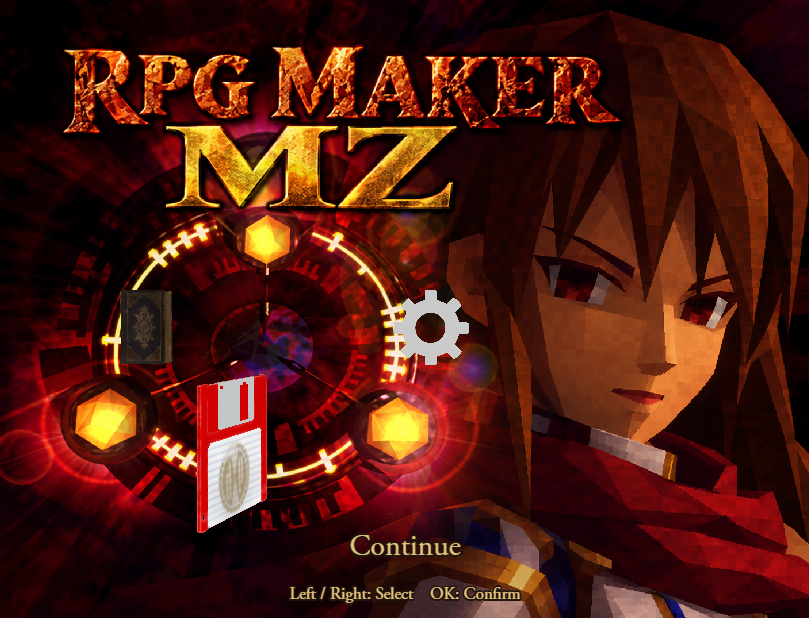
Blue_TitleCroft is a plugin for RPG Maker MZ that completely transforms the default title screen into a fully animated 3D ring menu inspired by the classic adventure games of the PlayStation era.
Instead of selecting commands from the traditional RPG Maker window, title commands are represented by real 3D objects arranged around a rotating ring.
New Game, Continue, Options and even commands added by other plugins can each be associated with their own 3D model.
The system is highly customizable and includes model positioning, automatic scaling, ring animations, camera configuration, lighting, retro rendering options and full mouse / touch support.
MAIN FEATURES
- Fully animated 3D title command ring.
- Inspired by classic PS1 adventure game title menus.
- Real glTF / GLB 3D model support.
- Assign a different 3D model to every title command.
- Supports RPG Maker's default New Game, Continue and Options commands.
- Supports additional title commands created by other plugins.
- Automatic model centering and scaling with Auto Fit.
- Individual scale, rotation, offset and rotation axis for every model.
- Smooth opening and ring rotation animations.
- Selected object scaling and spinning.
- Optional idle rotation for non-selected objects.
- Configurable ring position, radius and tilt.
- Configurable 3D camera and field of view.
- Optional retro / PSX-style rendering.
- Adjustable 3D rendering resolution.
- Unlit rendering mode for texture-focused retro graphics.
- Optional dynamic lighting with two configurable lights.
- Custom title background support.
- Custom logo support.
- Custom command labels.
- Keyboard and gamepad navigation.
- Mouse wheel navigation.
- Mouse and touch selection.
- Resolution-independent positioning for the main interface elements.
- Safe fallback system for missing or invalid models.
- Uses the original RPG Maker title command handlers.
HOW IT WORKS
Blue_TitleCroft uses the commands already registered inside the RPG Maker title window.
Each command can be associated with a 3D model through the Model Custom Settings plugin parameter.
For example:
newGame  → passport/passport.glb
continue → floppy/floppy.glb
options  → compass/scene.gltf
The command symbol determines which title command will be executed.
This means the 3D object is only the visual representation of the command: the original RPG Maker command handler is still used when the player confirms the selection.
INSTALLATION
Place:
Blue_TitleCroft.js
inside:
js/plugins/
and enable it from the RPG Maker MZ Plugin Manager.
The plugin also requires the included Pixi3D library:
js/libs/pixi3d-2.5.0.js
Blue_TitleCroft automatically loads the library before RPG Maker initializes the renderer.
Your 3D models should be placed inside a models folder located in the root directory of the project:
YourGame/
├── audio/
├── data/
├── img/
├── js/
├── models/
└── index.html
3D MODELS
The recommended format is glTF 2.0.
The easiest format to manage is usually:
.glb
with PNG/JPEG textures embedded directly inside the model.
Standard .gltf models are supported too.
If your model contains separate resources such as:
scene.gltf
scene.bin
textures/
you must preserve the original folder structure.
Example:
models/
  passport/
    passport.glb

  floppy/
    floppy.glb

  compass/
    scene.gltf
    scene.bin
    textures/
      texture.png
You can then use paths such as:
passport/passport.glb
floppy/floppy.glb
compass/scene.gltf
inside Model Custom Settings.
IMPORTANT
The following compressed formats are not currently supported:
- Draco compressed models;
- Meshopt compressed models;
- KTX2 / Basis compressed textures.
If necessary, re-export the asset as a standard glTF/GLB model.
For title screens, low-poly models and reasonably sized textures are strongly recommended.
MODEL CUSTOM SETTINGS
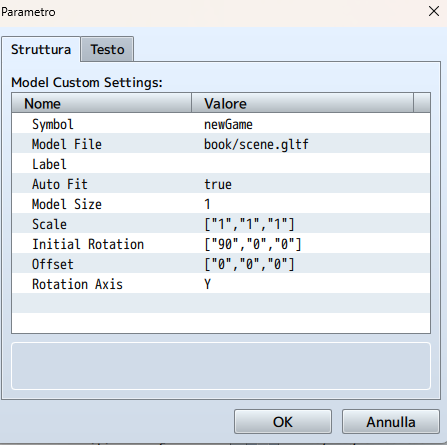
Every entry inside Model Custom Settings represents one title command.
Each model contains the following options.
Symbol
The symbol of the RPG Maker title command represented by the model.
Default symbols include:
newGame
continue
options
Symbols are case-sensitive.
Commands created by other plugins can also be used as long as they already exist inside the title command window and have their own handler.
Model File
Path of the model relative to the configured Model Root.
Example:
passport/passport.glb
Label
Optional text that replaces the original command name.
Leave this empty to automatically use the command name registered by RPG Maker or another plugin.
Auto Fit
Automatically centers the model and normalizes its dimensions.
This is recommended for most models.
Model Size
When Auto Fit is enabled, this determines the normalized size of the model in the 3D scene.
A good starting value is:
1
Scale
Additional X, Y and Z scale multipliers.
Example:
[1, 1, 1]
Initial Rotation
Initial model rotation in degrees.
Example:
[90, 0, 0]
This is especially useful because models downloaded from different sources may use different coordinate systems.
Offset
Moves the model after centering and scaling.
Example:
[0, 0, 0]
It can be useful for visually correcting unusual model pivots.
Rotation Axis
Determines the axis used when the selected object spins.
Available values are:
X
Y
Z
None
RING SETTINGS
The 3D ring itself can be customized directly from the Plugin Manager.
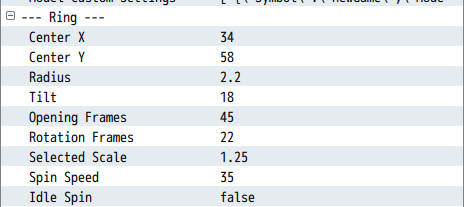
Center X / Center Y
Position of the ring on the screen.
These values are percentages of the current game resolution, making the layout easier to adapt to different resolutions.
Radius
Controls the distance between the objects and the center of the ring.
Tilt
Tilts the ring on the X axis.
Positive values visually lift the objects positioned toward the rear of the ring.
Opening Frames
Controls the duration of the opening animation.
Rotation Frames
Controls how quickly the ring moves between commands.
Selected Scale
Scale multiplier applied to the currently selected object.
Spin Speed
Controls how quickly the selected object rotates.
Idle Spin
If enabled, non-selected objects rotate too.
CAMERA AND 3D RENDERING
The plugin includes several options for controlling the 3D presentation.
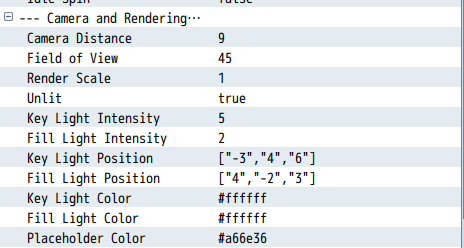
Camera Distance
Controls the distance between the camera and the 3D ring.
Field of View
Controls the perspective of the 3D camera.
Render Scale
Controls the internal resolution of the 3D layer.
1.00 = native resolution
< 1  = lower resolution / retro appearance
Using values below 1 can help reproduce a more pixelated PlayStation-era aesthetic.
The lower-resolution 3D layer uses nearest-neighbor scaling.
Unlit
When enabled, models primarily display their texture colors without dynamic lighting.
This is particularly useful for retro / PSX-inspired visuals.
Disable it if you want to use the dynamic lighting system.
LIGHTING
When Unlit is disabled, Blue_TitleCroft uses two configurable lights:
- Key Light
- Fill Light
You can customize:
- Light intensity;
- Light position;
- Light color.
This allows the same model to be adapted to very different title screen atmospheres.
PRESENTATION
The plugin can also customize the surrounding title screen.
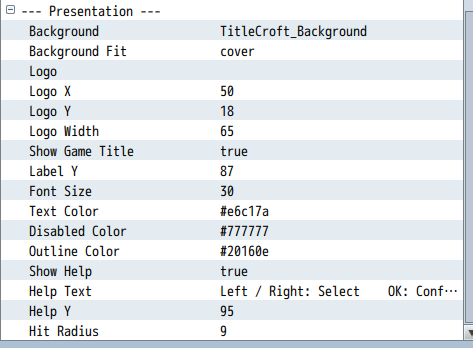
Background
Optional image from:
img/pictures/
used instead of the normal RPG Maker title background.
Leave the parameter empty to use the title background configured in the RPG Maker database.
Background Fit
Available fitting modes:
Cover
Contain
Stretch
Logo
Optional image loaded from:
img/pictures/
The logo position and maximum width can be configured using percentage-based coordinates.
Show Game Title
Determines whether RPG Maker's normal game title is displayed.
Text Appearance
You can customize:
- Command font size;
- Text color;
- Disabled command color;
- Outline color;
- Command label position.
Help Text
An optional control hint can be displayed on the title screen.
Its text and vertical position are customizable.
CONTROLS
Blue_TitleCroft supports keyboard, gamepad, mouse and touch controls.
Keyboard / Gamepad
Left / Right → Rotate the ring
Up / Down    → Rotate the ring
OK           → Confirm command
Mouse
Mouse Wheel → Rotate the ring
Click       → Select object
Click selected object again → Confirm
Touch
Tap object → Select
Tap selected object again → Confirm
Disabled commands remain visible but cannot be executed.
For example, Continue remains visible when no save file exists and uses RPG Maker's normal disabled-command behavior.
CUSTOM TITLE COMMANDS
Blue_TitleCroft does not recreate the title command system.
Instead, it reads the commands already registered inside RPG Maker's title command window. Because of this, commands added by another plugin can also appear inside the 3D ring.
Simply create a Model Custom Settings entry using the same command symbol.
For example:
Symbol: achievements
Model File: trophy/trophy.glb
Label: Achievements
The external plugin must still provide the actual command and its handler.
Blue_TitleCroft handles its 3D representation and selection, not the command logic itself.
SAFE FALLBACK SYSTEM
The plugin includes several safeguards designed to avoid leaving the title screen unusable.
If a configured model cannot be loaded, Blue_TitleCroft displays a configurable placeholder cube instead.
This makes it possible to test the ring layout even before all final models are ready.
If the Pixi3D library itself cannot be loaded, the plugin falls back to the ordinary RPG Maker title menu.
Model loading also uses a configurable timeout so the title screen does not wait indefinitely for a broken resource.
EXPORTING YOUR GAME
There is one important additional step when deploying a game using Blue_TitleCroft.
Make sure the exported game contains:
models/
js/libs/pixi3d-2.5.0.js
RPG Maker MZ's Exclude Unused Files system cannot automatically detect these external 3D resources.
For this reason, verify that the models directory and Pixi3D library are included in your final build.
3D models are also not processed by RPG Maker's image encryption system.
PLUGIN COMPATIBILITY
Blue_TitleCroft is designed to preserve RPG Maker MZ's existing title command system instead of replacing the command logic itself.
The plugin aliases the title scene and uses its own isolated 3D camera and lighting environment.
For best compatibility, place Blue_TitleCroft below core / resolution plugins.
Plugins that simply add commands to the default title window should generally be usable as long as their commands and handlers are created before Blue_TitleCroft builds the 3D ring.
Plugins that completely replace the title scene, rendering system or title input may require additional compatibility work.
Full compatibility with every VisuStella title-related extension cannot be guaranteed.
RPG MAKER VERSION
The plugin is developed for:
RPG Maker MZ
Tested technical stack:
RPG Maker MZ v1.10.0
PIXI.js 5.3.12
Pixi3D 2.5.0
This plugin is NOT compatible with RPG Maker MV.
ASSET DISCLAIMER
Blue_TitleCroft is inspired by the presentation and 3D menu style of classic adventure games.
No copyrighted Tomb Raider models, music, backgrounds or other proprietary assets are included with the plugin.
Any third-party 3D models used in your project remain subject to their respective licenses.
TERMS OF USE
- Credits to Bluemoon / Sparrow Tales.
- Credits are required or highly appreciated, depending on the license included with the downloaded package.
- You may edit the code for your own project.
- This plugin can be used in both commercial and non-commercial projects.
- Do not redistribute this plugin as-is.
- Do not incorporate portions of this plugin into another plugin for redistribution.
- Do not remove or alter the plugin header information, filename or parameter names.
- Third-party 3D models and other external assets are subject to their respective licenses.
Thank you very much for the support!
Purchase
In order to download this tool you must purchase it at or above the minimum price of $9.99 USD. You will get access to the following files:
Development log
Leave a comment
Log in with itch.io to leave a comment.