Character List - For Rpg Maker MZ
A downloadable Rpg Maker MZ Plugin
GENERAL
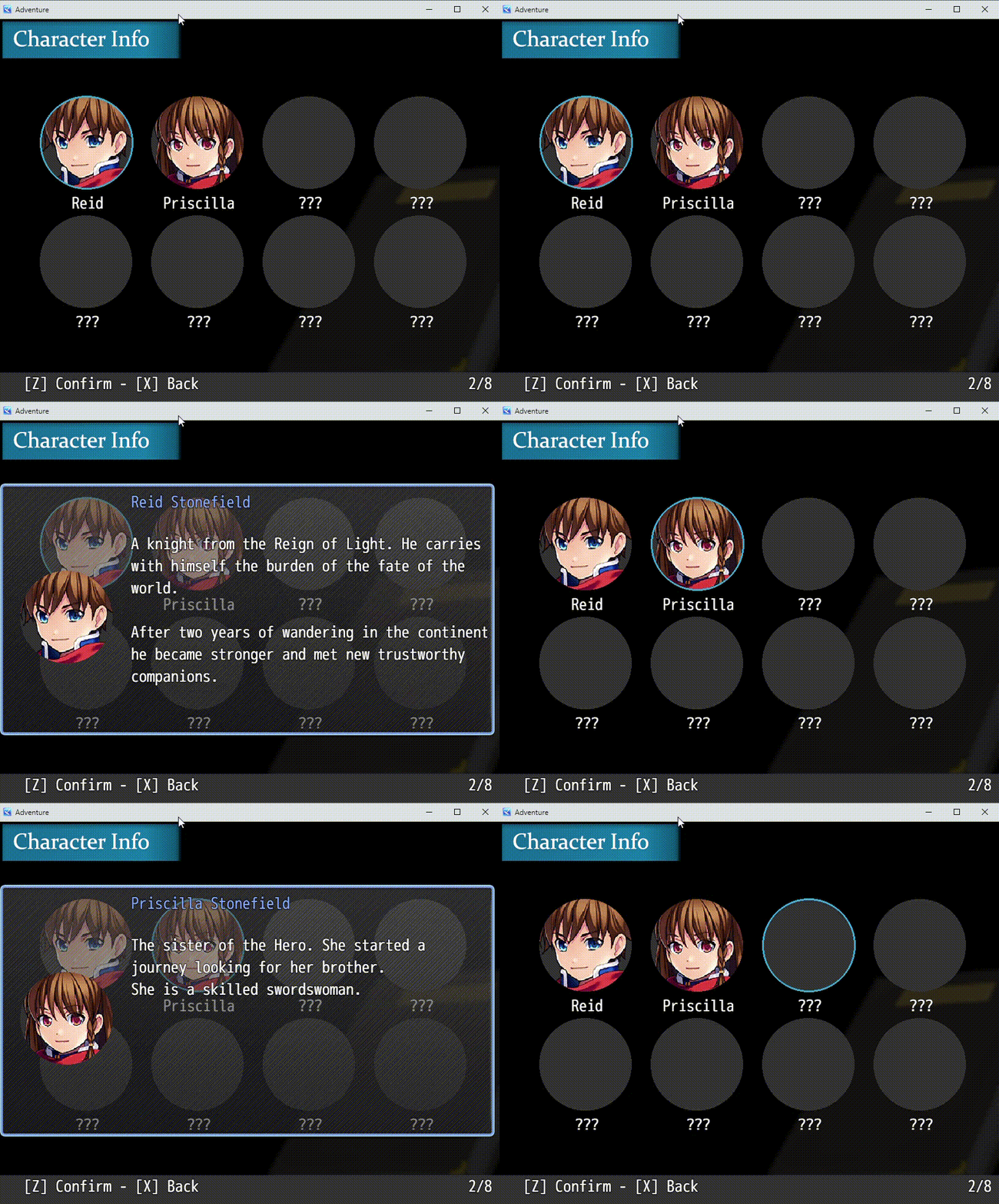
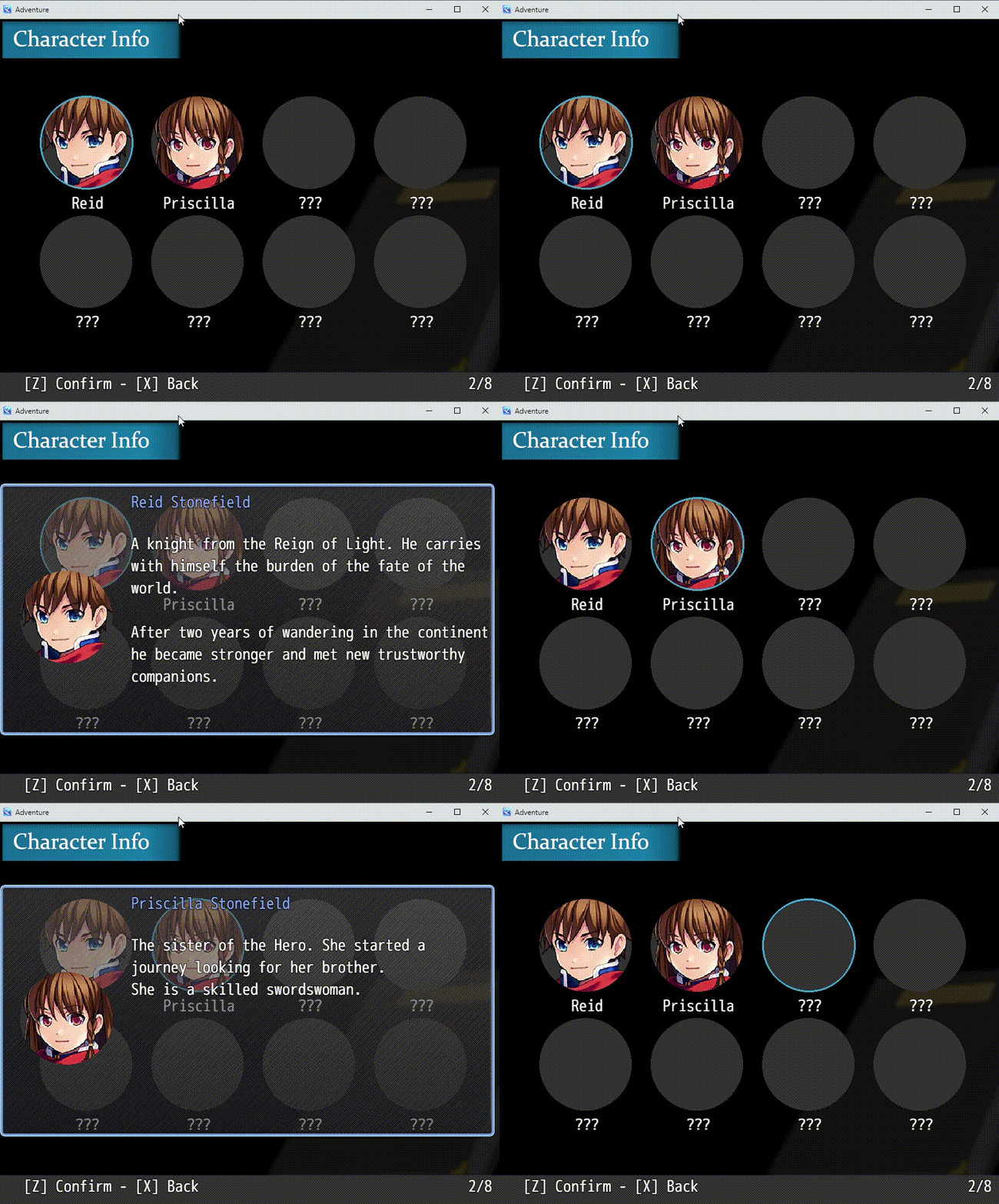
"Character List" is a plugin for RPG Maker MZ heavily inspired by the character list featured in "World End Syndrome".

FEATURES
- Character List inspired by World End Syndrome, with fully customizable character entries;
- Support for large character casts wtih automatic scrolling when the visible area is exceeded;
- Easily customizable graphical assets stored inside a dedicated CharacterList subfolder in img/pictures/;
- Character data is configured through the plugin parameters and some values can also be dynamically edited in-game;
- The Character List can be added directly to the main menu through the plugin parameters. The plugin is also compatible with VisuMZ_1_MainMenuCore.js; more information about compatibility can be found below;
- Character descriptions can be easily customized, and escape codes are supported;
- Character entries can use different unlocking conditions, including switches, JavaScript conditions, and manual unlocking;
- Version 1.1.0 improves support for larger character lists, scrolling behavior, parameter handling, and general stability.
GRAPHICAL ASSETS:
This plugin uses a set of custom graphical assets stored inside a folder named CharacterList. The graphics created for showcasing the plugin are free to download from this project page.
The CharacterList folder must be placed inside the img/pictures/ folder of your game.

Image filenames are case-sensitive. Let's take a look at the required files.
The purpose of most of these images should be fairly self-explanatory by looking at the showcase images above. However, there is one important thing to keep in mind regarding containeratlas and containermask.
These two images are used to draw each entry inside the Character List scene. In particular, containeratlas determines both the background frame and selection cursor of an entry, while containermask is used to properly mask the character faceset inside its frame.
The way containeratlas.png is displayed is also affected by one of the plugin parameters explained below: Character List Item Size.
Finally, the plugin draws the standard RPG Maker actor faces inside each entry. Faces can either use their default size or be slightly enlarged through the Character Face Zoom parameter explained below.
PLUGIN PARAMETERS:
The main functionalities offered by this plugin can be configured through the available plugin parameters.
Unknown Entry -> This is the text displayed when a character entry is still locked.
Character List Item Size -> This parameter determines the width and height of each character entry inside the Character List window, where the containeratlas graphics are drawn. I recommend setting these values slightly larger than the actual size of a single containeratlas frame in order to leave enough spacing between entries.
Character Face Zoom -> This parameter determines whether the actor faceset should be slightly enlarged. If set to TRUE, the character face is scaled to approximately x1.2, which can help it fit the default container graphics more naturally.
Entries per row -> Determines the number of character entries displayed in each row.
Total Elements Format -> This is the format string used to display the number of currently unlocked entries compared to the total number of entries in the footer window.
Command Hints Text -> This is the text constantly displayed in the footer window. Despite its name, it does not necessarily have to contain command hints: you can use this field to display any text you want.
Character List Menu Name and Show In Menu -> These parameters determine whether the Character List command is shown inside the game's Scene_Menu, as well as the name of the command.
These parameters behave differently when VisuMZ_1_MainMenuCore is enabled. Check the Plugin Compatibility section below for more information.
List -> This structure contains all the character entries that will appear inside the Character List scene.
There is no hardcoded limit of eight characters: you can add as many entries as required for your project. Larger casts will continue onto additional rows and can be navigated through the Character List window.
Let's take a closer look at the available properties.
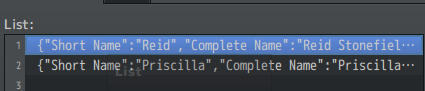
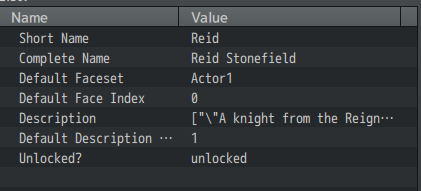
Some of these parameters can also be changed or updated dynamically during the game through the plugin commands explained below.
Short Name -> The short name of the character entry. This is the name displayed directly inside the Character List.
Complete Name -> The full name of the character entry displayed inside the information window.
Default Faceset -> The default faceset used for the character entry.
Default Face Index -> The default face index associated with the selected faceset.
Description -> This array contains all the descriptions that can be displayed inside the character information window. You can define multiple descriptions for the same character and dynamically switch between them as your game's story progresses.
Each description is independent from the others. Increasing or decreasing the Description Index does not merge descriptions together; it simply selects another description from the array.
Default Description Index -> Determines which description from the Description array is displayed by default.
The index starts from 1.
Unlocked? -> This parameter determines the condition that must be satisfied before an entry becomes visible as an unlocked character.
Several options are available:
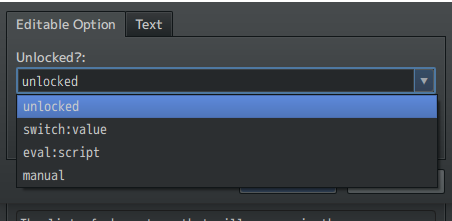
unlocked -> The character entry is unlocked from the beginning of the game.
switch (ex. switch:3) -> The character entry is unlocked when the specified RPG Maker switch is set to TRUE.
For example:
switch:3
will unlock the character whenever Switch 3 is ON.
eval -> Advanced users can use their JavaScript knowledge to define a custom unlocking condition.
For example:
eval:$gameVariables.value(35) % 4 === 0
The entry will be unlocked whenever the provided JavaScript condition evaluates to true.
manual -> The character entry can only be unlocked manually through the dedicated plugin command explained below.
WARNING! Regardless of the unlocking method originally assigned to an entry, manually forcing an entry to be unlocked will temporarily take priority over its normal unlocking condition.
If the manual unlock is later set back to FALSE, the original unlocking method will once again determine whether the entry should be unlocked.
PLUGIN COMMANDS:
The plugin provides two plugin commands.
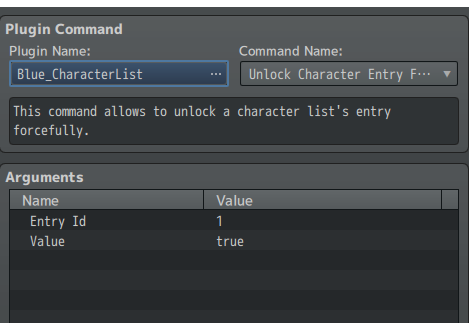
Unlock Character Entry is a plugin command that allows you to manually force a character entry to be unlocked inside the Character List.
As mentioned above, a manual unlock takes priority over the other unlocking methods while it is active.
Entry ID represents the position of the entry inside the Character List and starts from 0.
For example:
- The first character has Entry ID 0;
- The second character has Entry ID 1;
- The third character has Entry ID 2.
You can set the manual unlock value to either TRUE or FALSE.
If you set the manual unlock back to FALSE, the character's original unlocking condition will become active again.
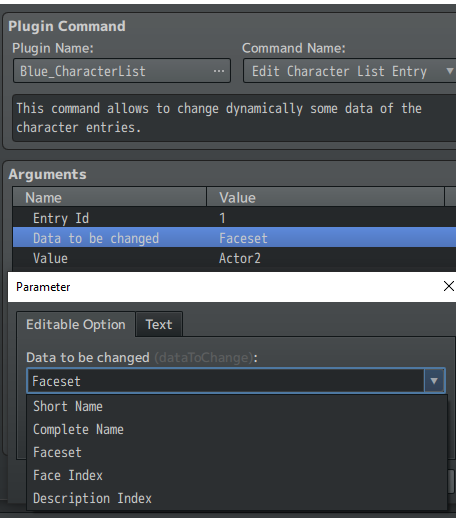
Edit Character List Entry allows you to dynamically edit some of the data associated with a character entry.
The values that can currently be changed can be seen in the image above.
These changes are stored inside the game's save data.
Changes made directly to the default values inside the plugin parameters will still be detected when loading the game. However, if a custom value has already been assigned to that property through the plugin command, the custom value will be used instead.
You can restore a property to its default value by writing the word:
"default"
inside the Value field.
PLUGIN COMPATIBILITY:
This plugin is designed to be compatible with VisuStella's core plugins and should generally work alongside other RPG Maker MZ plugins as long as they do not heavily overwrite the same default classes and methods used by Character List.
Version 1.1.0 also includes several small stability improvements intended to make the plugin safer to use in existing projects.
About VisuMZ_1_MainMenuCore.js:
If VisuMZ_1_MainMenuCore.js is enabled inside your Plugin Manager, the Show In Menu parameter will not automatically add the Character List command to the menu.
Instead, the command should be added through the parameters provided by VisuStella's Main Menu Core.
Here are some default settings you can use.
Settings for Command Window List plugin parameter:
{"Symbol:str":"_character_list","Icon:num":"50","TextStr:str":"Character List","TextJS:func":"\"\"","ShowJS:func":"\"return !!$gameSystem._showCharacterList\"","EnableJS:func":"\"return true\"","ExtJS:func":"\"return null;\"","CallHandlerJS:func":"\"SceneManager.push(Scene_CharacterList)\"","PersonalHandlerJS:func":"\"\""}
You can, of course, customize these settings further if you are familiar with VisuStella's configuration system.
For example, $gameSystem._showCharacterList could be used to determine whether the command is enabled instead of whether it is visible, depending on the behavior you want for your project.
RPG MAKER VERSION:
The plugin was originally developed using RPG Maker MZ Version 1.4.0 and its corresponding PIXI.js Version 5.2.4.
The plugin has since received maintenance and compatibility updates, including the improvements introduced with Character List v1.1.0.
This plugin is NOT compatible with RPG Maker MV.
TERMS OF USE:
- Credits to BlueMoon || Sparrow Tales.
- Avoid to change plugin information, filename and parameters name for the sake of integrity of the code.
- Edits to the code are allowed.
- The plugin can be used for both commercial and non-commercial projects.
- You can't redistribute this plugin as it is or incorporating portion of the code inside another plugin;
Purchase
In order to download this Rpg Maker MZ Plugin you must purchase it at or above the minimum price of $5.99 USD. You will get access to the following files:
Development log
- Character List v1.1.0 is now available!33 days ago

Comments
Log in with itch.io to leave a comment.
hello! Is it possible to have more than 8 characters on the list? I'm looking for a good character select plugin that'd support a large cast and don't have a good way of seeing this plugin's maximum
Hi! Yes, you can definitely have more than 8 characters in the list. There isn't a hard-coded 8-character limit — the plugin uses all the entries you add to the Character List, and the window can scroll through larger casts.
Today has been released a long-awaited update to version 1.1.0 that fixes several little issues.
Thank you for your interest!
Hello, I need help with your plugin. I cannot actually get it to work or update in my events and constantly run into errors that no matter what I try, I cannot seem to fix.
im so confuesed, can i get some help? i cant seem to get this to work
hi there!
What kind of issue you're experiencing?